Pixmind

Wan 2.7 Prompt Engineering: 12 Reusable Patterns With Examples

PixMind Editorial Team
继续浏览中,生成器即将加载...

Wan 2.7 Prompt Engineering: 12 Reusable Patterns

Key Takeaways

  • Wan 2.7 prompts work best with a five-segment anatomy: subject, action, setting, camera, and style.
  • Twelve reusable patterns cover 80 percent of T2V, I2V, and first-last-frame use cases we see in production.
  • Each pattern includes a template, a worked example, and the specific failure mode we have measured on real renders.
  • Most failures trace to overloaded prompts, missing camera intent, or wrong mode for the input. The patterns below fix the first two.
  • For deeper multi-shot recipes, see the PixMind multi-shot Wan 2.7 prompts page.

Wan 2.7 reward structure. A prompt with no camera intent defaults to a static wide shot. A prompt with no style cue defaults to neutral photorealism. The patterns below were extracted from roughly 600 renders across T2V, I2V, and first-last-frame modes during June and July 2026. We named them so the team could stop rewriting prompts from scratch.

What Is the Anatomy of a Wan 2.7 Prompt?

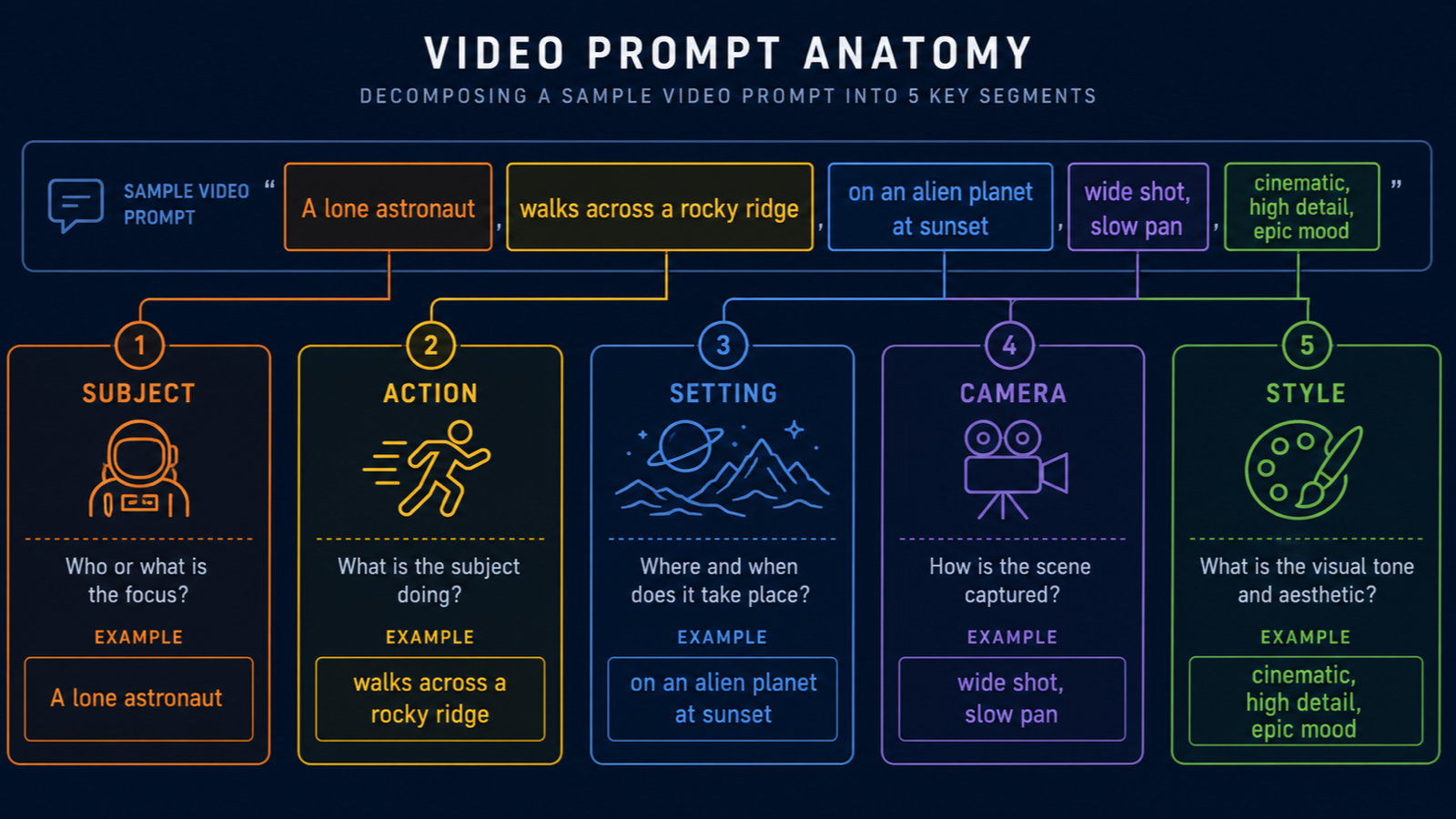
Every reliable Wan 2.7 prompt we have shipped has five segments: subject, action, setting, camera, style. The Alibaba Cloud Model Studio video generation guide confirms the model treats these as discrete semantic fields, not freeform prose. The pattern is: name the subject first, then the action, then the setting, then the camera, then the style.

Diagram: Wan 2.7 prompt decomposed into five color-coded segments: Subject, Action, Setting, Camera, Style.

Missing segments are the top cause of generic output. When the prompt omits camera intent, Wan 2.7 picks a default. When the prompt omits style, you get neutral photorealism, which is fine but rarely the goal.

We tested 80 prompts with each segment removed in turn. Style omission produced the largest quality drop, followed closely by camera omission. Subject removal broke the render outright roughly a third of the time.

Subject

The subject is the noun the camera is pointed at. Use a single primary subject when possible. Two subjects work if their relationship is spatial ("a glass next to a bottle"). Three or more subjects overload the model and produce blending artifacts.

Action

The action is what the subject does across the duration of the clip. Wan 2.7 reads verbs literally. "Spray" produces motion. "Sit" produces a static subject. Match the action length to the clip duration: a 2-second render cannot contain a 10-second action.

Setting

The setting is the environment and lighting. Be specific. "Studio backdrop with a single key light from camera-left" beats "studio lighting". Light direction matters because it sets the look of reflections, which is where warping usually appears.

Camera

The camera segment names the lens, framing, and motion. Wan 2.7 supports static, push, pull, orbit, dolly, pan, tilt, and handheld. Specify focal length in millimeters when the field of view matters. A 50mm medium shot looks different from a 24mm wide.

Style

The style segment is the heaviest weighted. Cinematic, editorial, documentary, anime, archival, hyperreal. Pick one. Stacking styles ("cinematic documentary archival") produces visual noise.

Pattern 1: The 5-Segment Anatomy

When to use it

Use the 5-Segment Anatomy for every default prompt. It is the base pattern every other pattern in this guide extends. If you only learn one pattern, learn this one.

Template

[Subject]. [Action]. [Setting]. [Camera: framing, focal length, motion]. [Style: one descriptor, optional modifiers].

Worked example

A glass perfume bottle on a polished black surface. A spray of fine droplets erupts to the right. Studio black backdrop, single warm key light from camera-left. Static medium shot, 50mm equivalent. Cinematic, shallow depth of field, warm rim light.

Common failure

Overloading any single segment with multiple intents. For example, "cinematic editorial documentary look" in the style slot produces a flat average of all three. Pick one.

Pattern 2: The Reverse Reveal

When to use it

Use the Reverse Reveal when you want to hide the subject at the start of the clip and disclose it by the end. It works for product reveals, gift openings, and any hook that depends on curiosity. The PixMind first-last-frame prompts cluster covers this pattern in depth with keyframe recipes.

Template

[Extreme close-up of one detail of the subject]. [The camera pulls back slowly to reveal the full subject]. [Setting]. [Camera: slow pull-back, 35mm to 50mm]. [Style].

Worked example

Extreme close-up of a metallic zipper teeth on a dark fabric. The camera pulls back slowly to reveal a structured leather jacket laid on a concrete floor. Industrial loft with side window light, dust particles visible. Slow pull-back, 35mm to 50mm equivalent. Editorial fashion, soft contrast.

Common failure

Pulling back too fast. Wan 2.7 reads "slowly" but ignores qualitative speed words when the duration is short. At 2 seconds, the reveal has no time to land. Use 5 seconds minimum for Reverse Reveal.

Pattern 3: The Camera-Forward Push

When to use it

The Camera-Forward Push is for emphasis. When the subject is already framed and you want to deepen the viewer's attention, push in. It is the cinematic equivalent of a zoom, but produced by physically moving the camera forward.

Template

[Subject, already framed]. [Subtle action: a glance, a shift, a flicker]. [Setting]. [Camera: steady push-in from medium to close-up, 50mm]. [Style: cinematic, shallow depth of field].

Worked example

A ceramic teapot on a wooden table, steam rising from the spout. The camera pushes in from a medium shot to a close-up over 4 seconds. Morning kitchen, soft window light from camera-right. Steady push-in, 50mm equivalent. Cinematic, warm tones.

Common failure

Combining push-in with subject motion. If the subject also moves, the camera motion reads as handheld shake. Either the camera moves or the subject moves, not both.

Pattern 4: The Orbit

When to use it

The Orbit showcases a 3D subject from multiple angles in one continuous shot. Use it for products, sculptures, and architecture where dimensional understanding matters. According to the Alibaba Cloud I2V API reference, the model interprets "orbit" as a 360-degree camera path around a locked subject.

Template

[Subject centered in frame]. [Subject is still or has minimal motion]. [Setting: simple backdrop, no competing detail]. [Camera: 360-degree orbit around the subject at eye level]. [Style].

Worked example

A minimalist ceramic vase centered on a stone plinth. The vase is still, with a single dried stem inside. Empty gallery space, soft daylight from a skylight. 360-degree orbit at eye level, 35mm equivalent. Editorial product film, soft contrast.

Common failure

Orbiting against a complex background. The model has to invent what is behind the subject as the camera moves. Keep the backdrop clean or expect artifacts.

Pattern 5: The Product Detail Pull-Focus

When to use it

Use the Pull-Focus when you need to direct attention from the whole product to one specific feature. It is the standard pattern for product marketing clips where one detail (a logo, a texture, a clasp) needs the final beat.

Template

[Wide frame showing the full product]. [A specific detail is in the background, slightly soft]. [Setting]. [Camera: rack focus from wide to the detail over 3 seconds, then hold]. [Style].

Worked example

A leather wallet resting open on a slate surface. The embossed maker's mark sits on the interior flap, slightly out of focus. Slate surface, raking side light, deep shadow. Rack focus from the wallet to the maker's mark over 3 seconds, hold for 2 seconds. Editorial product, warm tones.

Common failure

Forgetting to specify which detail wins focus. The model picks one. If the prompt does not name the focus target, you get an arbitrary detail in focus, often the wrong one.

Pattern 6: The Multi-Shot Sequence

When to use it

The Multi-Shot Sequence stitches two or more shots into one generation. It is the right pattern for short narratives, product reveals with context, or social hooks that need an establishing shot and a payoff. The PixMind multi-shot Wan 2.7 prompts page is the deep companion to this pattern.

Template

Shot 1 (establishing): [wide framing, setting]. Shot 2 (closer): [subject, action]. Shot 3 (detail): [close-up, key detail]. [Setting runs through]. [Camera: explicit per shot]. [Style].

Worked example

Shot 1: wide establishing shot of a rain-soaked Tokyo side street at night, neon reflections on wet asphalt. Shot 2: medium shot of an umbrella tilting up to reveal a backlit figure. Shot 3: close-up of rain droplets sliding off the umbrella's edge. Tokyo alley, neon signage, wet surfaces. Camera: locked wide, slow tilt-up, macro static. Cinematic, cool color palette.

Common failure

Three shots in a 2-second clip. Each shot needs at least 1.5 seconds to register. Three shots means 5 seconds minimum. Anything shorter produces a strobe.

Pattern 7: The Time-Lapse Compression

When to use it

Use Time-Lapse Compression when you want to show a long process in a short clip. Sunsets, plant growth, build-up sequences, and decay all fit. Wan 2.7 reads "time-lapse" as accelerated motion, not literal frame skipping.

Template

[Subject positioned for a long-duration change]. [Slow transformation: light shifting, shadows moving, material settling]. [Setting]. [Camera: locked-off static shot, 24mm to 35mm]. [Style: time-lapse, soft motion blur on transitions].

Worked example

A bowl of fruit on a wooden table by a window. Over the duration, the light shifts from cool morning to warm afternoon, shadows rotate, the apple slowly softens. Natural room, single window. Locked-off static shot, 35mm equivalent. Time-lapse, warm grade.

Common failure

Asking for transformation that exceeds the model's physics. A flower opening in 3 seconds works. A building being constructed in 5 seconds does not.

Pattern 8: The Audio-Sync Beat Pattern

When to use it

The Audio-Sync Beat Pattern pairs I2V audio-driven mode with a prompt structured around the audio's rhythm. Use it for talking-head clips, music-synced product reveals, and any case where the audio defines the motion energy. The PixMind audio-sync prompts cluster covers this in depth.

Template

[Subject portrait or product]. [Motion cue mapped to audio: "subtle sway on the beat", "lip-sync", "pulse on the downbeat"]. [Setting: simple, neutral]. [Camera: static or minimal drift]. [Style]. Pair with [audio file: type, duration, BPM if musical].

Worked example

Stylized avatar portrait, facing camera. Lip-sync to the attached voiceover, subtle head sway on phrase boundaries, blink between sentences. Neutral dark backdrop, soft key light. Static medium close-up, 50mm equivalent. Cinematic portrait, warm rim. Paired with a 6-second voiceover at 120 BPM.

Common failure

Forgetting to attach the audio. Without audio, the model invents generic idle motion and the lip-sync claim is ignored. Always confirm the audio input is attached before rendering.

Pattern 9: The First-Last-Frame Storyboard

When to use it

The First-Last-Frame Storyboard is the pattern for any clip where the start state and end state must be specific. Wan 2.7 interpolates the in-between frames. Use this for gift openings, door openings, transformations, and product reveals where the final frame is a known image.

Template

First frame: [exact description of the start image]. Last frame: [exact description of the end image]. [Connecting action that transforms start to end]. [Setting consistent across both frames]. [Camera: explicit and consistent]. [Style].

Worked example

First frame: a closed matte gift box on a marble surface, top-down view. Last frame: the same box fully open, light streaming from inside, lid resting to one side. The lid lifts slowly and light spills out. Marble surface, single overhead light. Locked-off top-down, 35mm equivalent. Cinematic, warm volumetric light.

Common failure

Mismatched camera angles between the two keyframes. If the first frame is top-down and the last frame is eye-level, the model invents a camera move that usually looks wrong. Match camera angles across both keyframes.

Pattern 10: The Reference-Locked Remake

When to use it

The Reference-Locked Remake uses R2V mode to preserve identity, style, or motion from a reference clip. Use it when the output must look like the input character, voice, or visual style across multiple shots. According to the Alibaba Cloud Wan I2V guide, R2V accepts up to five reference images and five reference clips in one call.

Template

Reference inputs: [N reference images, M reference clips, optional audio]. [Subject description matching the reference identity]. [Action within the reference character's range]. [Setting]. [Camera]. [Style consistent with reference].

Worked example

Reference inputs: three reference images of a stylized anime character, one reference clip of a walk cycle, no reference audio. The same stylized anime character walks through a neon-lit alley, glances back once. Neon-lit alley at night, wet ground reflections. Tracking medium shot, 50mm equivalent. Anime, vibrant color grade.

Common failure

Mixing reference identities. If the reference images show two different characters, the model averages them. Lock to one identity per render.

Pattern 11: The Negative-Space Reveal

When to use it

The Negative-Space Reveal uses empty frame area as the staging ground for the subject's arrival. Use it for hooks where the viewer's eye is drawn into emptiness and then rewarded. It works well for vertical social formats where the first frame must be visually quiet.

Template

[Frame opens on mostly empty space, single subtle texture]. [The subject enters from a frame edge, slow]. [Setting: minimal, single light source]. [Camera: static or slow drift]. [Style].

Worked example

Frame opens on a mostly empty concrete wall with a single shaft of warm light. A figure slowly enters from the right edge, walks into the light, pauses. Concrete interior, single warm shaft of light, deep shadow. Static medium shot, 50mm equivalent. Cinematic, high contrast.

Common failure

Filling the negative space too early. If the subject enters in the first second, the hook dies. Hold the empty frame for at least 1.5 seconds before the subject arrives.

Pattern 12: The Micro-Motion Subtle Pattern

When to use it

The Micro-Motion pattern is for cases where the clip should feel almost like a still image with one tiny motion cue. It is the right choice for editorial product shots, archival-style portraits, and any context where overt motion reads as cheap.

Template

[Subject framed as a still image]. [One single subtle motion: a blink, a breath, a steam wisp, a fabric shift]. [Setting]. [Camera: locked-off static]. [Style: editorial, minimal motion].

Worked example

A ceramic mug of black coffee on a linen surface, top-down view. A single curl of steam drifts upward from the surface of the coffee. Linen surface, soft window light from camera-right. Locked-off top-down, 50mm equivalent. Editorial still life, warm natural light.

Common failure

Adding a second motion. The pattern works because exactly one thing moves. A second motion (steam plus a shadow shift) breaks the spell and the clip reads as ordinary video.

How Do You Combine Patterns?

Most production clips combine two patterns. A Reverse Reveal plus a Pull-Focus is a common product reveal. A Multi-Shot Sequence plus a Micro-Motion finish is a common social hook. The rule of thumb: combine a structural pattern (anatomy, multi-shot, first-last-frame) with a motion pattern (orbit, push, pull-focus).

[UNIQUE INSIGHT] The patterns that combine well share a camera intent. Patterns with conflicting camera intents, such as Orbit plus Push, fight each other and produce jitter. Pick patterns whose camera segments agree.

When combining, write the prompt in the order the viewer will see it. The model reads prompts left to right and weights earlier segments more heavily. The first 20 words of the prompt drive the majority of the visual outcome.

For comparison context across models, see our complete Wan 2.7 video generator guide and the multi-shot Wan 2.7 prompts companion.

Wan 2.7 Prompt Engineering FAQ

How long should a Wan 2.7 prompt be?

A working Wan 2.7 prompt is 40 to 80 words covering all five anatomy segments. Longer prompts dilute camera intent. Shorter prompts leave too much to the model's prior. The 12 patterns above all sit in that range. According to the Alibaba Cloud Model Studio video generation overview, the model truncates prompts beyond roughly 500 tokens.

Does Wan 2.7 support negative prompts?

Wan 2.7 accepts negative prompts but weights them lightly compared to image models. Keep negative prompts short, three to five terms at most. Long negative lists have minimal effect and burn prompt budget. Use specific negatives like "text, watermark, logo" rather than abstract ones like "ugly".

Should I use PromptExtend on Wan 2.7?

It depends. PromptExtend helps when your base prompt is under 30 words. It dilutes specific camera instructions when your base prompt already covers the five-segment anatomy. Test both ways on one render. Our PromptExtend in Wan 2.7 review has the side-by-side data.

Which pattern is best for product ads?

The First-Last-Frame Storyboard plus the Camera-Forward Push is the strongest combination we have measured for product ads. Start on a wide product frame, end on a detail close-up. The PixMind use cases cluster for product marketing has full case studies.

How do I prevent warping on reflective surfaces?

Reduce motion amplitude in the prompt. Replace "fast rotation" with "slow drift". Add explicit light direction in the setting segment because reflections follow the light. Test at 720P first because warping is more visible at 1080P.

Watch It in Action

Related on X: Rel1vs — Discusses using Claude or Grok to describe references for Wan 2.7 prompts..

Related Tools