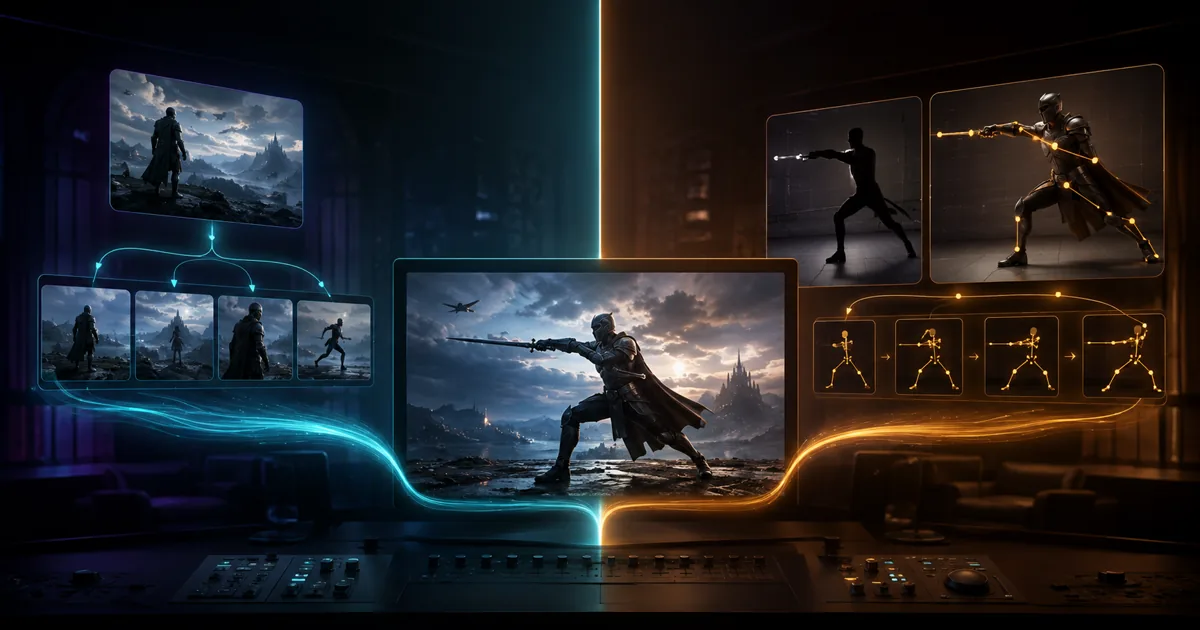
Esta ilustración editorial generada con Codex explica cómo elegir la ruta. No es un resultado de Kling ni una prueba de la calidad del modelo.
Usa kling-3.0-turbo cuando quieras crear un plano corto nuevo a partir de texto o de una única imagen inicial. Usa kling-v3-motion-control cuando ya tengas un vídeo de baile, movimiento deportivo, gesto o interpretación que el personaje deba seguir. La primera ruta inventa el movimiento a partir de instrucciones; la segunda lo transfiere desde un vídeo de referencia.
Estas rutas resuelven tareas de producción distintas y ofrecen controles diferentes. Según lo verificado el 5 de septiembre de 2026, Turbo no ofrece audio nativo, fotogramas inicial y final, varias referencias ni un control de cámara específico. Motion Control requiere una imagen de personaje y un vídeo de referencia de movimiento de hasta 30 segundos.
Empieza por el selector de rutas de Kling si aún no tienes claro qué necesita el plano.
Puntos clave
- Elige
kling-3.0-turbopara generar en Studio un plano nuevo de entre 3 y 15 segundos a partir de texto o de una imagen inicial. El configurador actual de la API ofrece 5 o 10 segundos. - Elige
kling-v3-motion-controlpara transferir una interpretación existente desde un vídeo de referencia de movimiento a una imagen de personaje. No es una ruta de texto a vídeo. - Las funciones de la familia Kling VIDEO 3.0 original no aparecen automáticamente en ninguna de las rutas conectadas. Revisa los controles disponibles antes de planificar audio, 4K, varios planos o un trabajo con numerosas referencias.
- Los precios de Motion Control no coinciden actualmente entre las páginas públicas. Considera cada tarifa publicada como una instantánea fechada y toma como definitivo el presupuesto aceptado de la tarea.
- No se realizó una prueba de generación controlada para esta guía. El artículo documenta campos públicos de las rutas, orientación oficial y controles de producción; no declara un ganador por calidad visual.
Kling 3.0 Turbo frente a Motion Control: la decisión rápida
La forma más rápida de elegir una ruta parte del material que ya tienes. Una idea escrita o un único fotograma de producto apuntan a Turbo. Un vídeo que contiene la interpretación exacta que necesitas apunta a Motion Control.
| Pregunta de producción | Elige | Motivo |
|---|---|---|
| Tengo un prompt y necesito un gancho nuevo para redes sociales | kling-3.0-turbo |
Acepta texto y crea un plano corto nuevo. |
| Tengo una imagen de producto y necesito movimiento de cámara o del objeto | kling-3.0-turbo |
La imagen de origen actúa como referencia visual inicial para convertir imagen en vídeo. |
| Tengo un baile, un entrenamiento, un movimiento deportivo o un gesto que quiero reproducir | kling-v3-motion-control |
El vídeo de referencia proporciona la secuencia de movimientos. |
| Necesito conservar el sonido existente del vídeo de referencia | API de kling-v3-motion-control |
keep_original_sound puede conservar ese audio. No genera una banda sonora nueva. |
| Necesito audio nativo conectado, 4K, varias referencias o fotogramas inicial y final | Ninguna ruta actual puede prometerlo | Esas funciones pueden existir en el modelo original, pero los controles conectados actuales no las ofrecen. |
Un prompt detallado no sustituye al vídeo de referencia cuando la coreografía exacta es importante. Motion Control añade preparación innecesaria cuando el objetivo es una presentación breve de producto.
Comparación actual de las rutas de Studio y API
Las rutas comparten el nombre de la familia, pero no el contrato de entrada. Esta tabla separa los datos de Studio y de la API. Los valores reflejan las páginas públicas consultadas el 5 de septiembre de 2026 y pueden cambiar.
| Superficie | ID exacto del modelo | Entrada obligatoria | Duración | Resolución | Relación de aspecto | Sonido | Instantánea de precio |
|---|---|---|---|---|---|---|---|
| Turbo Studio | kling-3.0-turbo |
Texto, o texto más una imagen inicial | La página indica entre 3 y 15 segundos; los ajustes preestablecidos muestran 5, 10 y 15 | 720p o 1080p | 16:9, 9:16, 1:1 | No disponible | 168 créditos por segundo generado |
| API de Turbo | kling-3.0-turbo |
prompt; imageUrl opcional |
5 o 10 segundos en el configurador público | 720p o 1080p | 16:9, 9:16, 1:1, 4:3, 3:4 | No hay un campo de audio público | Desde $0,13 por segundo generado |
| Motion Control Studio | kling-v3-motion-control |
Una imagen de personaje y un vídeo de referencia de movimiento | Vídeo de referencia de hasta 30 segundos | Consulta el generador en tiempo real | Consulta el generador en tiempo real | No es un flujo de generación de sonido nativo | Consulta el generador en tiempo real |
| API de Motion Control | kling-v3-motion-control |
character_image_url más motion_video_url; prompt opcional |
No hay un campo de duración independiente; la facturación se basa en los segundos entregados | 720p o 1080p | Se controla mediante la composición y la orientación de origen | Conservación opcional del sonido original | Las instantáneas públicas de precios no coinciden; el presupuesto aceptado es definitivo |
Compara los controles disponibles de Turbo Studio con el contrato de la API de Turbo, ya que las opciones de duración y relación de aspecto son distintas.
Para transferir movimiento, consulta por separado Motion Control Studio y su página del modelo de API.
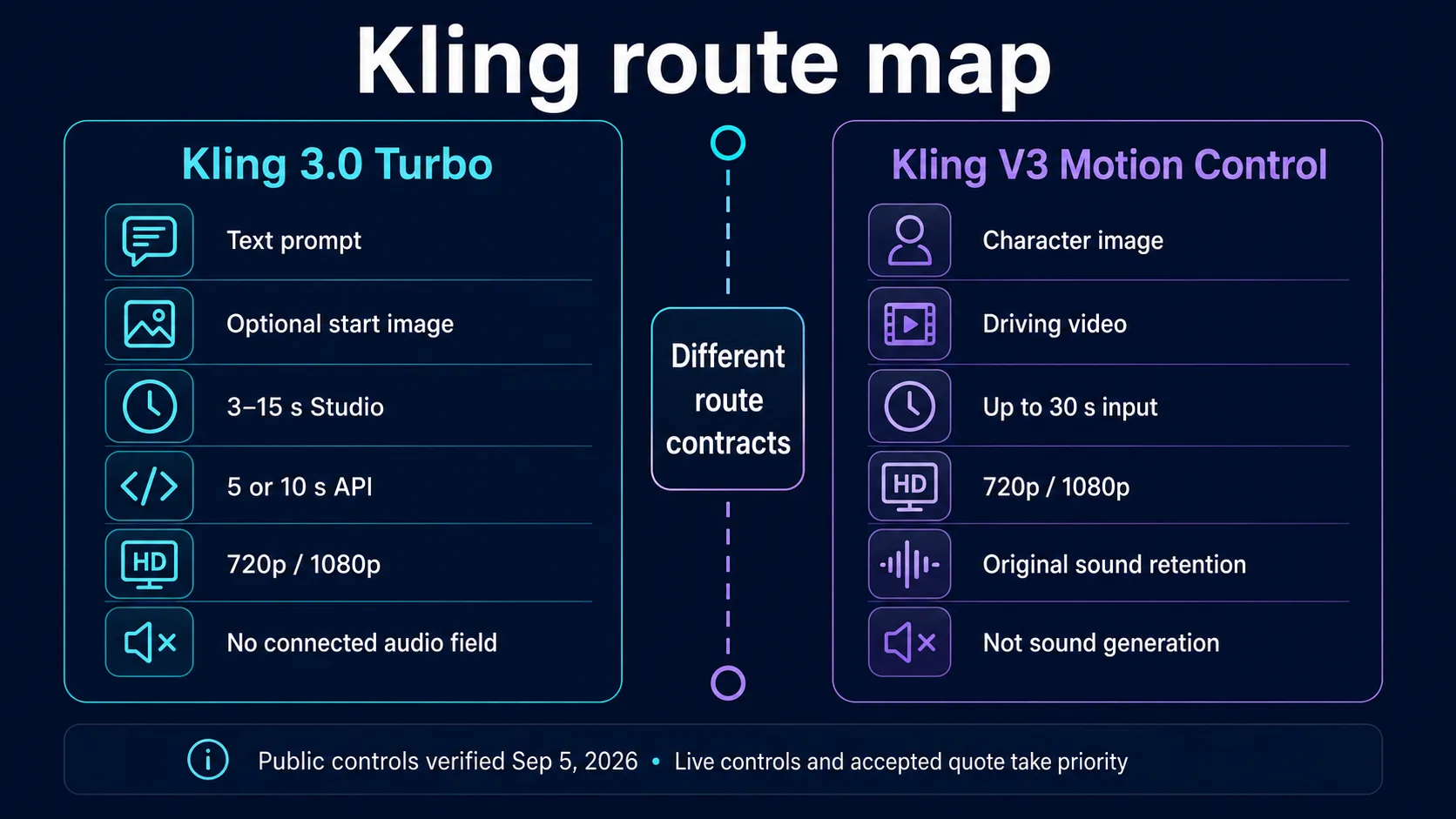
Mapa editorial de rutas verificado con los controles públicos el 5 de septiembre de 2026. No es una prueba basada en resultados de Kling.
Por qué las funciones originales de Kling 3.0 no definen las rutas conectadas
Kling VIDEO 3.0 es una familia de modelos original más amplia. Kuaishou anunció esta familia el 5 de febrero de 2026 con vídeos de hasta 15 segundos, generación audiovisual nativa, narraciones de varios planos, diálogos multilingües y referencias de elementos mediante imágenes o vídeos. Su guía oficial también aborda la conversión de texto a vídeo, la conversión de imagen a vídeo, los fotogramas inicial y final y los flujos basados en referencias.
Estas funciones de la familia sirven como contexto, pero no constituyen una promesa operativa para todas las integraciones. Los controles actuales de Turbo ofrecen un conjunto más limitado: texto, una imagen inicial opcional, resolución, duración y relación de aspecto. No ofrecen un campo de audio, varias referencias de imagen, vídeo de referencia, fotogramas inicial y final, prompts negativos ni un control de cámara específico. La salida conectada actual alcanza como máximo 1080p, por lo que un anuncio de 4K para la familia original no debe presentarse como una función 4K de la ruta.
El mismo límite se aplica a Motion Control. Kuaishou lo describió en sus resultados del ejercicio 2025, y la guía oficial de Kling VIDEO 3.0 presenta Motion Control como una mejora del flujo de trabajo de la versión 2.6. Su contrato de solicitud sigue exigiendo una imagen de personaje y un vídeo de referencia de movimiento.
Planifica según los controles que realmente puedes enviar. Si falta un campo obligatorio para tu flujo, considera que la función no está disponible hasta que cambie el contrato de la ruta.
Flujo de trabajo de Turbo: crea un plano corto nuevo
Turbo funciona mejor cuando el plano se define mediante una acción visible y un movimiento principal de cámara. La guía oficial de Kling VIDEO 3.0 recomienda describir con claridad el sujeto, el entorno, la acción, el movimiento de cámara y el estilo visual. Una estructura compacta ayuda a evitar que estas instrucciones compitan entre sí.
Prompt reutilizable para texto a vídeo
[Shot size] of [subject] in [environment], performing [one visible action].
The camera [one primary camera move] at [speed].
[Lighting, material, and mood].
End on [final composition].
Keep [identity, shape, color, logo placement, or label] stable.
Ejemplo:
Medium close-up of a silver running shoe on a wet stone platform at dawn.
The shoe rotates once as water beads slide across its surface.
The camera makes a slow clockwise orbit.
Soft blue backlight, realistic rubber and woven fabric texture.
End on a clean side profile. Keep the sole shape and red heel tab stable.
Prompt reutilizable para animar una sola imagen
Preserve the subject, composition, colors, and key geometry from the source image.
Animate [one subject motion] over [short timing description].
The camera [one restrained camera move].
The background [subtle environmental response].
Finish with [stable end pose or product angle].
Empieza con la duración más corta que permita expresar la acción. Revísala antes de aumentar la duración o añadir un segundo movimiento. Esto permite controlar las variables, pero no garantiza un resultado mejor.
Para un gancho en redes sociales, usa un primer momento fácil de interpretar. En un plano de producto, da prioridad a la forma, la colocación de la etiqueta y un único movimiento de cámara contenido. Construye las narraciones más largas como una secuencia de clips planificados en lugar de dar por hecho que los controles de varios planos del modelo original están conectados.
Para una producción que combina varios clips, utiliza la guía del flujo de trabajo de AI Video Agent para planificar las transiciones entre planos y las fases de revisión.
Flujo de trabajo de Motion Control: transfiere una interpretación existente
Motion Control utiliza el vídeo de referencia de movimiento como especificación de la acción y la imagen de personaje como referencia de identidad. El prompt opcional puede reforzar las restricciones, pero no sustituye a ninguno de los dos archivos.
Lista de comprobación de la entrada de movimiento
Comprueba todos los puntos antes de enviar la tarea. Estas restricciones se contrastaron con la guía oficial de usuario de Motion Control:
- Una persona principal: mantén un único sujeto dominante en ambos archivos. La orientación oficial indica que el flujo actual admite un sujeto principal y que, si aparecen varias personas, puede seleccionar a la de mayor tamaño en el encuadre.
- Encuadre equivalente: combina una imagen de medio cuerpo con una interpretación de medio cuerpo, o una imagen de cuerpo entero con una interpretación de cuerpo entero.
- Anatomía visible: mantén visibles la cara, la cabeza, las manos y los pies cuando la acción dependa de ellos. Deja espacio suficiente para los gestos amplios.
- Vídeo de referencia continuo: da preferencia a un único plano sin interrupciones. Evita cortes bruscos, cambios repentinos de ángulo, oclusiones intensas y desenfoque de movimiento.
- Velocidad de acción moderada: un movimiento extremadamente rápido dificulta la revisión del contacto, las extremidades y la identidad.
- Aspecto compatible: una gran diferencia entre la complexión del personaje, la estructura de su ropa y la acción de referencia aumenta el riesgo de la transferencia.
- Material con derechos autorizados: confirma que tienes permiso para usar a la persona, la interpretación, la ubicación, la música, la voz y cualquier material de marca antes de subirlos.
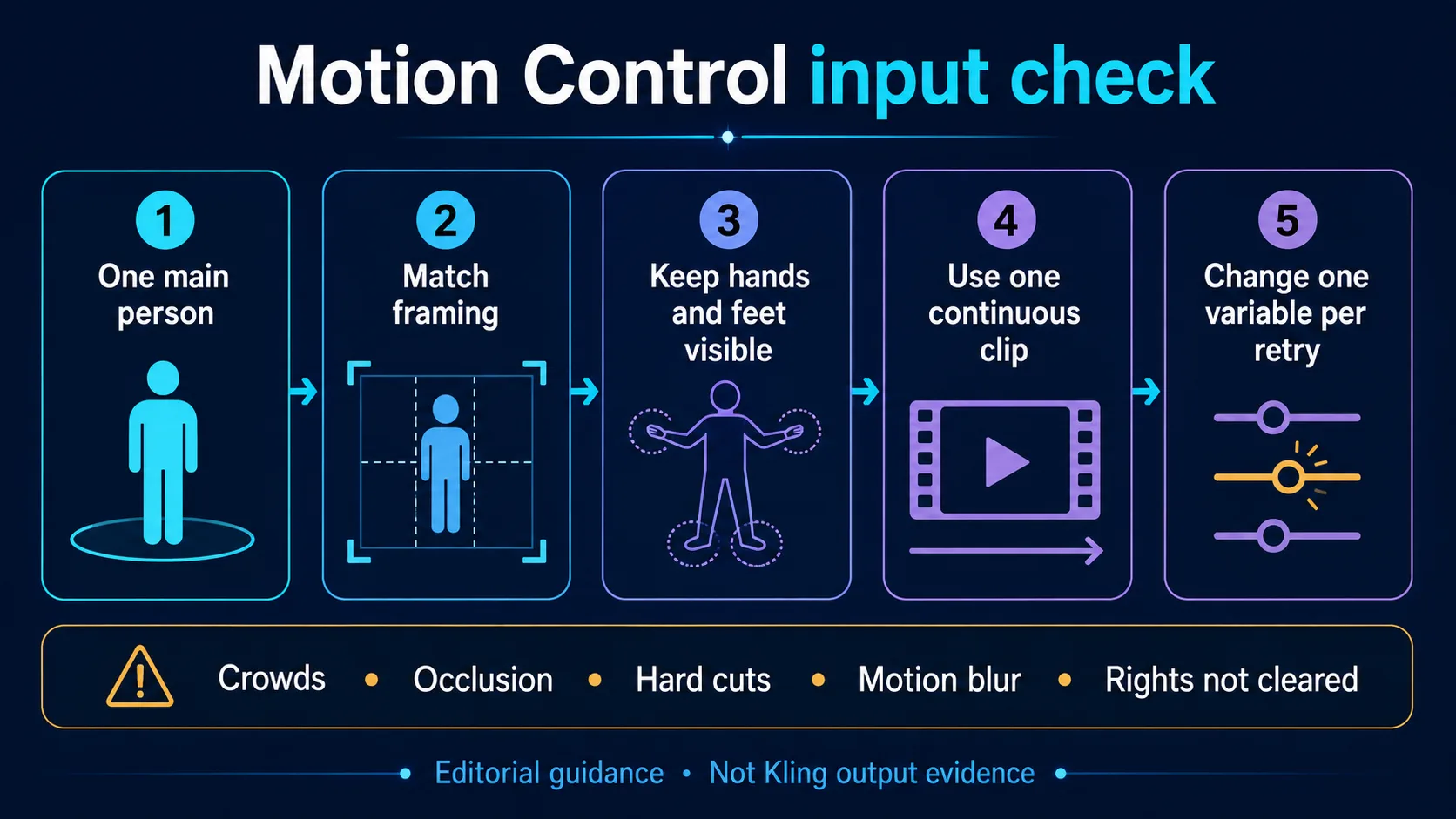
Lista editorial de comprobación de entradas basada en la guía oficial de Motion Control. No es una prueba basada en resultados de Kling.
Elige la orientación de forma deliberada
La API ofrece character_orientation con los valores image o video. Elige video cuando quieras que el personaje siga más de cerca la orientación y la relación con la cámara del vídeo de referencia. Elige image cuando sea más importante conservar la dirección hacia la que mira el personaje en la imagen y quieras dirigir la cámara mediante el prompt.
La API también ofrece keep_original_sound, cuyo valor predeterminado es false. Si lo estableces en true, conserva el audio original del vídeo de referencia. No crea diálogos, música, efectos de sonido ni voz sincronizada nuevos.
Prompt reutilizable para Motion Control
Keep the character's facial identity, hair silhouette, outfit colors, and body proportions consistent.
Follow the driving video's [named action] and timing.
Preserve [image orientation / driving-video orientation].
Keep the background [static / subtly responsive] and avoid adding people or props.
Maintain clear hands, feet, and contact with [object or ground].
La guía oficial indica que Element Binding utiliza la información facial, pero no fija automáticamente la ropa, el peinado, el maquillaje ni los objetos. Especifica y revisa esos detalles en lugar de considerarlos garantizados.
Cuatro situaciones de producción y la ruta adecuada
Gancho para redes sociales a partir de un concepto escrito
Elige Turbo. Describe una acción del sujeto, un movimiento de cámara y un fotograma final. Quienes utilicen la API pueden seleccionar 9:16 para un formato vertical. Prueba primero la duración útil más corta.
Movimiento de producto a partir de una imagen de catálogo
Elige Turbo con una imagen inicial. Pide en el prompt que se conserven la geometría, el color, la colocación de la etiqueta y la disposición del fondo. Evita combinar en el primer intento una transformación compleja del objeto con una órbita rápida y un gran cambio de iluminación.
Transferencia de baile, deporte o gestos
Elige Motion Control. La interpretación exacta ya existe, de modo que el vídeo de referencia aporta más información útil que una larga descripción escrita. Iguala el encuadre y reduce al mínimo las oclusiones antes de cambiar la redacción del prompt.
Plano guiado por el audio
No debes dar por hecho que ninguna de las dos rutas genera sonido nativo en su forma conectada actual. Motion Control puede conservar la pista original del vídeo de referencia mediante la API, pero eso es conservación, no síntesis. Si necesitas voz sincronizada o música recién generadas, elige una ruta que muestre expresamente esos controles. La guía de Wan 3.0 documenta un contrato de entrada y audio diferente.
Planificación de costes en Studio y API
Calcula el coste según la superficie, la resolución y la duración entregada. No mezcles los créditos de Studio con los importes en dólares de la API.
Para Turbo Studio, la instantánea del 5 de septiembre muestra 168 créditos por segundo: 840 por 5 segundos, 1.680 por 10 y 2.520 por 15. La página no muestra diferencias de créditos según la resolución.
Para la API de Turbo, la tarifa inicial pública es de $0,13 por segundo: $0,65 por 5 segundos y $1,30 por 10 antes de posibles ajustes. El presupuesto aceptado de la tarea es definitivo.
Motion Control requiere más cuidado. La página de Motion Control Studio, la página del modelo de API de Motion Control y la referencia de la API mostraron recientemente instantáneas públicas distintas, con tarifas de $0,16 y $0,17 por segundo; al consultarla, la referencia de la API indicaba $0,160 para 720p y $0,240 para 1080p. Por ello, esta guía no presenta una tarifa fija única en dólares. Revisa el presupuesto de la solicitud en tiempo real y, si necesitas conciliar los costes, guarda el presupuesto aceptado con el registro del trabajo.
La página de precios explica los cargos de la suscripción. Mantén una estimación separada de la API para cada ruta y vuelve a comprobarla antes de enviar tareas por lotes.
Revisión de calidad y solución de problemas con una sola variable
Revisa el clip completo fotograma a fotograma. Comprueba la identidad, las manos, los pies, las articulaciones, el contacto, la ropa, el fondo, el texto y el sonido. Una buena miniatura puede ocultar un fallo que aparece más adelante.
| Síntoma | Causa probable | Primer cambio | Mantén sin cambios |
|---|---|---|---|
| La identidad del personaje deriva | Movimiento rápido, oclusión, referencia débil o encuadre incompatible | Usa una referencia más clara o un segmento de movimiento más lento y limpio | La resolución, la estructura del prompt y la duración |
| Las manos o los pies se deforman | Las extremidades salen del encuadre, cruzan el cuerpo o se mueven demasiado rápido | Elige un clip con las extremidades visibles y menos oclusión | La imagen del personaje y la orientación |
| El movimiento queda cortado | La duración o el clip de origen no contienen un límite de acción claro | Recorta el vídeo a un movimiento completo o usa una opción de mayor duración si está disponible | El prompt y la identidad de origen |
| La forma del producto cambia | Hay demasiadas exigencias simultáneas de movimiento y estilo | Reduce la acción a un movimiento del objeto y uno de cámara | La imagen de origen y la relación de aspecto |
| La cámara se opone a la acción | La dirección de cámara del prompt entra en conflicto con la interpretación de origen | Elimina la instrucción de cámara adicional o cambia la orientación | El personaje y el vídeo de referencia |
| Aparecen personas u objetos inesperados | El encuadre está recargado o el prompt es ambiguo | Recorta para mostrar un solo sujeto e indica con lenguaje claro que no se añadan personas ni objetos | La acción principal y la duración |
| No se genera sonido nuevo | La ruta actual no tiene un campo de generación de sonido nativo | Añade el sonido en posproducción o elige una ruta que ofrezca audio nativo | El prompt visual y el ritmo |
| Falta el audio original | keep_original_sound está en false o no está disponible en la superficie elegida |
Actívalo en la API de Motion Control y comprueba los derechos | Las entradas visuales y la resolución |
Cambia una sola variable en cada reintento. Si cambias todas las entradas y ajustes a la vez, ocultas la causa. Registra los hashes de entrada, el ID de la ruta, los ajustes, el presupuesto aceptado y las notas de revisión.
Uso comercial y derechos sobre los archivos de entrada
El uso comercial está sujeto a condiciones; no se concede de forma automática. Los resultados elegibles creados mientras haya una suscripción de pago activa pueden usarse con fines comerciales, siempre de acuerdo con los Términos del servicio, las condiciones del modelo o proveedor seleccionado, los derechos del usuario sobre los archivos de entrada, los derechos de terceros y la legislación aplicable.
La generación no autoriza automáticamente el uso de marcas, imagen personal, música, coreografías, ubicaciones, personajes u otros materiales protegidos. La responsabilidad sobre los derechos de los prompts, las imágenes, las personas, las marcas, las voces, las interpretaciones y los archivos de terceros recae en quien los utiliza.
Motion Control añade dos comprobaciones específicas. La interpretación del vídeo de referencia puede estar sujeta a derechos propios de la persona intérprete o de la coreografía, y su audio original puede incluir derechos independientes sobre la música, la voz o la grabación. Activar la conservación del sonido original no concede una licencia comercial para esa pista.
Fuentes, fecha de verificación y limitaciones
Esta guía se verificó el 5 de septiembre de 2026 mediante las páginas públicas de Studio y API, las guías oficiales de Kling y los anuncios de Kuaishou. Los controles y precios pueden cambiar. Los campos disponibles y el presupuesto aceptado tienen prioridad.
Los datos sobre el modelo original proceden del anuncio de lanzamiento de Kling 3.0, los resultados del ejercicio 2025, los resultados del segundo trimestre de 2026 de Kuaishou y la guía oficial de usuario de Kling VIDEO 3.0.
Para esta actualización no se envió ninguna tarea de generación, no se llamó a ninguna API conectada ni se realizó una comparativa controlada de resultados. Las muestras oficiales y las imágenes promocionales no se consideraron pruebas de la calidad de la ruta. Por tanto, esta guía ayuda a elegir la ruta y preparar los archivos de entrada, pero no compara su calidad visual con la de otros modelos.
Preguntas frecuentes
¿Kling 3.0 Turbo genera audio en la ruta conectada actual?
No se encontró ningún campo público de audio en las superficies de Turbo Studio o API consultadas el 5 de septiembre de 2026. Los materiales de la familia Kling 3.0 original hablan de generación audiovisual nativa, pero esa función de la familia no se aplica automáticamente a esta ruta.
¿Alguna de las rutas admite salida 4K?
Las rutas conectadas actuales indican una resolución máxima de 1080p. Kuaishou ha anunciado 4K nativo para la familia Kling 3.0, pero los controles de las rutas consultadas no ofrecen 4K.
¿Cuál es la duración máxima?
Turbo Studio indica entre 3 y 15 segundos y muestra ajustes preestablecidos de 5, 10 y 15 segundos. El configurador actual de la API de Turbo solo ofrece 5 y 10 segundos. La página de Motion Control acepta un vídeo de referencia de hasta 30 segundos, mientras que la API no tiene un campo de duración independiente.
¿Turbo y Motion Control son dos modos del mismo modelo de API?
No. Utilizan ID de modelo y contratos de entrada diferentes. Turbo usa kling-3.0-turbo con un prompt y una imagen inicial opcional. Motion Control usa kling-v3-motion-control con una imagen de personaje y un vídeo de referencia obligatorios.
¿Motion Control puede transferir a varias personas a la vez?
La orientación oficial admite un sujeto principal. Si un vídeo de referencia incluye a varias personas, el sistema puede seleccionar a la de mayor tamaño en el encuadre. Usa una sola persona claramente visible para facilitar una configuración y revisión previsibles.
¿keep_original_sound=true crea diálogo o música nuevos?
No. Conserva el audio existente del vídeo de referencia. No sintetiza una banda sonora nueva ni concede derechos sobre la grabación conservada.
Comprobación final de la ruta
Elige Turbo cuando la tarea creativa parta de una idea o de una única imagen fija. Elige Motion Control cuando parta de una interpretación que debe transferirse. Después, comprueba la superficie disponible, porque los ajustes de Studio y API son distintos y es posible que las funciones de la familia original no estén conectadas.
Antes de enviar la tarea, registra el ID del modelo, los archivos de entrada, la duración, la resolución, la relación de aspecto o la orientación, la elección de sonido y el presupuesto aceptado. Esto facilita el diagnóstico de los reintentos.
Vuelve al hub de la familia Kling o a la página exacta de la ruta que seleccionaste para comenzar con el material de origen correspondiente.