
Pixmind
返回灵感展示
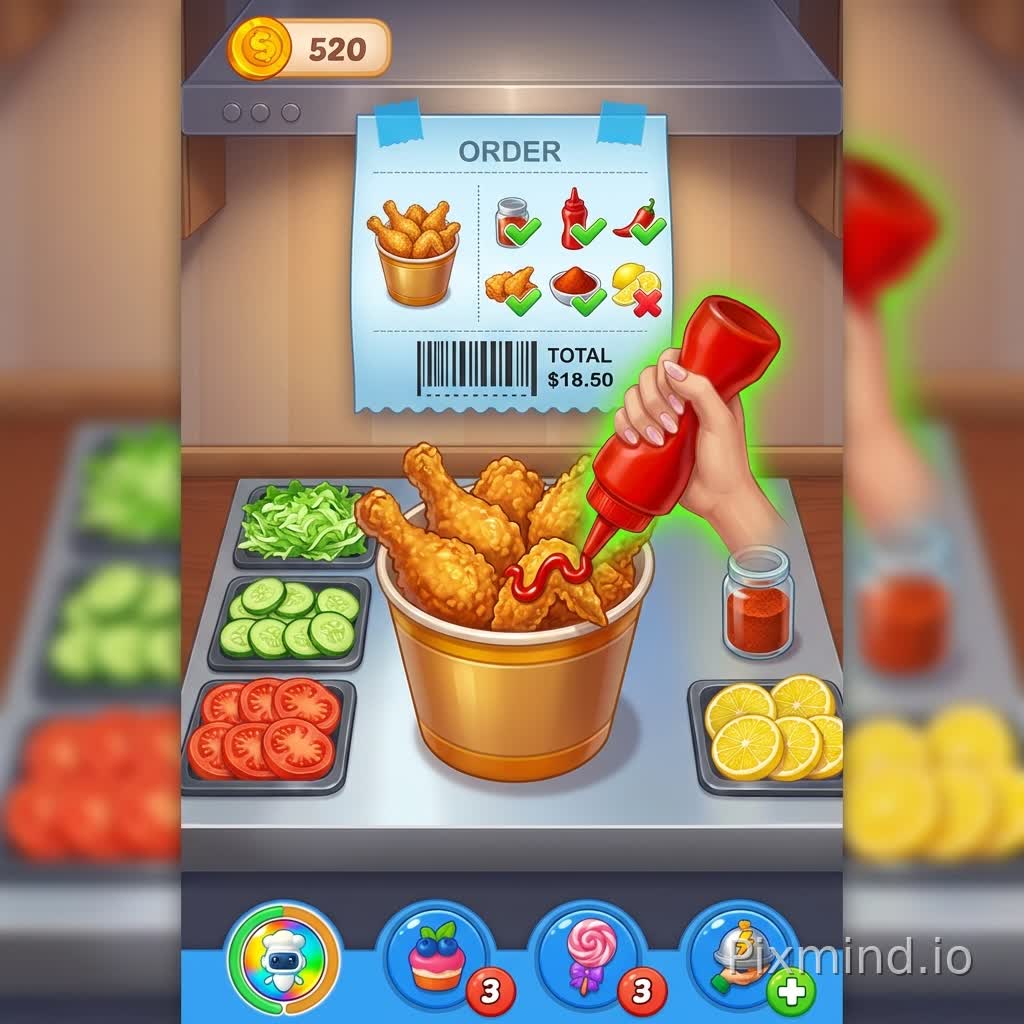
Regenerate a new image following the style of the reference images. The image quality and art style are the same as reference images 1, 2, and 3. The UI at the bottom of the image uses the blue UI from reference image 4. Aspect Ratio: Vertical 9:16 (e.g., 1080x1920px). Viewpoint: A combination of top-down and slightly upward perspectives, allowing the player to see the workbench and ingredients, emphasizing hand-eye coordination. Layering: Background Wall: Top 1/3, light-colored tiles or stainless steel background in a kitchen style, creating a clean and bright kitchen atmosphere. Workbench: Middle 1/2, displaying the fried chicken preparation station and ingredient trays, with neatly arranged ingredients to highlight the visual focus. Bottom Status Bar: Bottom 1/6, containing coins, item buttons, energy or hint buttons, maintaining the same style as the previous two images. Main Elements: Fried Chicken Main Body: A fried chicken bucket or platter is placed in the center, topped with several golden-brown fried chicken legs or wings, with a slightly oily and crispy texture. Next to the fried chicken are condiments (ketchup, honey mustard, chili powder, etc.), and the player is holding a sauce dispenser, preparing to decorate. Hand Operation: The player's hand reaches into the screen from below, holding the sauce dispenser or brush, and applies sauce to the fried chicken. Hand Details: Fingers are naturally curved, with appropriate lighting and shadows for a realistic feel. Ingredient Tray: Placed next to the fried chicken, neatly arranged: lettuce leaves, sliced ​​cucumber, tomato slices, seasoning powder/spice jar, lemon slices or chili flakes for decoration. Each ingredient is portioned into a small bowl or plate, increasing operability and color richness. Order Board: Placed above the screen, fixed to the wall, and secured with blue tape (continuing the style). Displays: Quantity and type of fried chicken, ingredient requirements (e.g., ketchup, chili powder, lemon slices, etc.), price, and completion status markers (√/×). Visually prominent elements are highlighted with green checkmarks and red crosses for easy player identification. Color Scheme: Main Colors: Warm Yellow + Brown (Fried Chicken) Secondary Colors: Red (Ketchup/Chili), Green (Lettuce/Lemon Leaves), Orange (Lemon Slices), White/Light Colors (Condiment Bowls/Background) Background Color: Light gray or off-white kitchen walls to highlight the food. Highlights and Shadows: Highlights on food surfaces enhance appetizing appeal. Subtle shadows on hands and the bottom of ingredient trays add dimension. Small reflective effects on the stainless steel countertop and the oily sheen of the fried chicken. Props and Interaction Tips: Three commonly used prop buttons can be placed at the bottom: Acceleration Button (Lightning Bolt Icon), Decoration Button (Candy or Decorative Icon), Hint Button (Question Mark or Halo). Maintain a round button design with soft shadows to emphasize clickability. Visual Details: Fried Chicken Surface: Slightly reflective oil, crispy skin, with a natural transition from light to dark gold in color. Condiments: Ketchup is a bright, fluid red, while honey mustard is a translucent yellow. Ingredients: Clearly cut vegetable surfaces, with natural textures on lettuce leaves for added realism. Light source: Soft light from the top left, creating subtle shadows and enhancing the image's depth. User's hand: Slightly highlighted and shaded, with fingers naturally curved as they grip the tool.
Nano Banana Pro Eco图片
000

提示词

Regenerate a new image following the style of the reference images. The image quality and art style are the same as reference images 1, 2, and 3. The UI at the bottom of the image uses the blue UI from reference image 4. Aspect Ratio: Vertical 9:16 (e.g., 1080x1920px). Viewpoint: A combination of top-down and slightly upward perspectives, allowing the player to see the workbench and ingredients, emphasizing hand-eye coordination. Layering: Background Wall: Top 1/3, light-colored tiles or stainless steel background in a kitchen style, creating a clean and bright kitchen atmosphere. Workbench: Middle 1/2, displaying the fried chicken preparation station and ingredient trays, with neatly arranged ingredients to highlight the visual focus. Bottom Status Bar: Bottom 1/6, containing coins, item buttons, energy or hint buttons, maintaining the same style as the previous two images. Main Elements: Fried Chicken Main Body: A fried chicken bucket or platter is placed in the center, topped with several golden-brown fried chicken legs or wings, with a slightly oily and crispy texture. Next to the fried chicken are condiments (ketchup, honey mustard, chili powder, etc.), and the player is holding a sauce dispenser, preparing to decorate. Hand Operation: The player's hand reaches into the screen from below, holding the sauce dispenser or brush, and applies sauce to the fried chicken. Hand Details: Fingers are naturally curved, with appropriate lighting and shadows for a realistic feel. Ingredient Tray: Placed next to the fried chicken, neatly arranged: lettuce leaves, sliced ​​cucumber, tomato slices, seasoning powder/spice jar, lemon slices or chili flakes for decoration. Each ingredient is portioned into a small bowl or plate, increasing operability and color richness. Order Board: Placed above the screen, fixed to the wall, and secured with blue tape (continuing the style). Displays: Quantity and type of fried chicken, ingredient requirements (e.g., ketchup, chili powder, lemon slices, etc.), price, and completion status markers (√/×). Visually prominent elements are highlighted with green checkmarks and red crosses for easy player identification. Color Scheme: Main Colors: Warm Yellow + Brown (Fried Chicken) Secondary Colors: Red (Ketchup/Chili), Green (Lettuce/Lemon Leaves), Orange (Lemon Slices), White/Light Colors (Condiment Bowls/Background) Background Color: Light gray or off-white kitchen walls to highlight the food. Highlights and Shadows: Highlights on food surfaces enhance appetizing appeal. Subtle shadows on hands and the bottom of ingredient trays add dimension. Small reflective effects on the stainless steel countertop and the oily sheen of the fried chicken. Props and Interaction Tips: Three commonly used prop buttons can be placed at the bottom: Acceleration Button (Lightning Bolt Icon), Decoration Button (Candy or Decorative Icon), Hint Button (Question Mark or Halo). Maintain a round button design with soft shadows to emphasize clickability. Visual Details: Fried Chicken Surface: Slightly reflective oil, crispy skin, with a natural transition from light to dark gold in color. Condiments: Ketchup is a bright, fluid red, while honey mustard is a translucent yellow. Ingredients: Clearly cut vegetable surfaces, with natural textures on lettuce leaves for added realism. Light source: Soft light from the top left, creating subtle shadows and enhancing the image's depth. User's hand: Slightly highlighted and shaded, with fingers naturally curved as they grip the tool.

宽高比: 1:1输出尺寸: 1024x1024