
動画から字幕と透かしを除去
ピクセル精度のAIで、あらゆる動画から焼き込み字幕、キャプション、ロゴ、透かしを消去。ボックスをドラッグ、消去を押して、数秒でクリーンなHD動画をダウンロード。
消去の様子を見る
同じ動画の消去前後——手動枠なし、スマート認識がすべて行います。
リアルな before & after 結果
枠を描いて消すだけ。字幕・キャプション・透かしがきれいに消えます。
同じシーン、字幕あり・なし
同じフレーム—左は焼き込み字幕あり、右はAIで消除。ドラッグで比較。
ハンドルをドラッグして比較
 処理前処理後
映画 & ドラマ
映画やドラマの焼き込み字幕とチャンネルロゴを消去します。
 処理前処理後
ショート動画
TikTok・Reels・Shortsの自動字幕とプラットフォーム透かしを消去します。
 処理前処理後
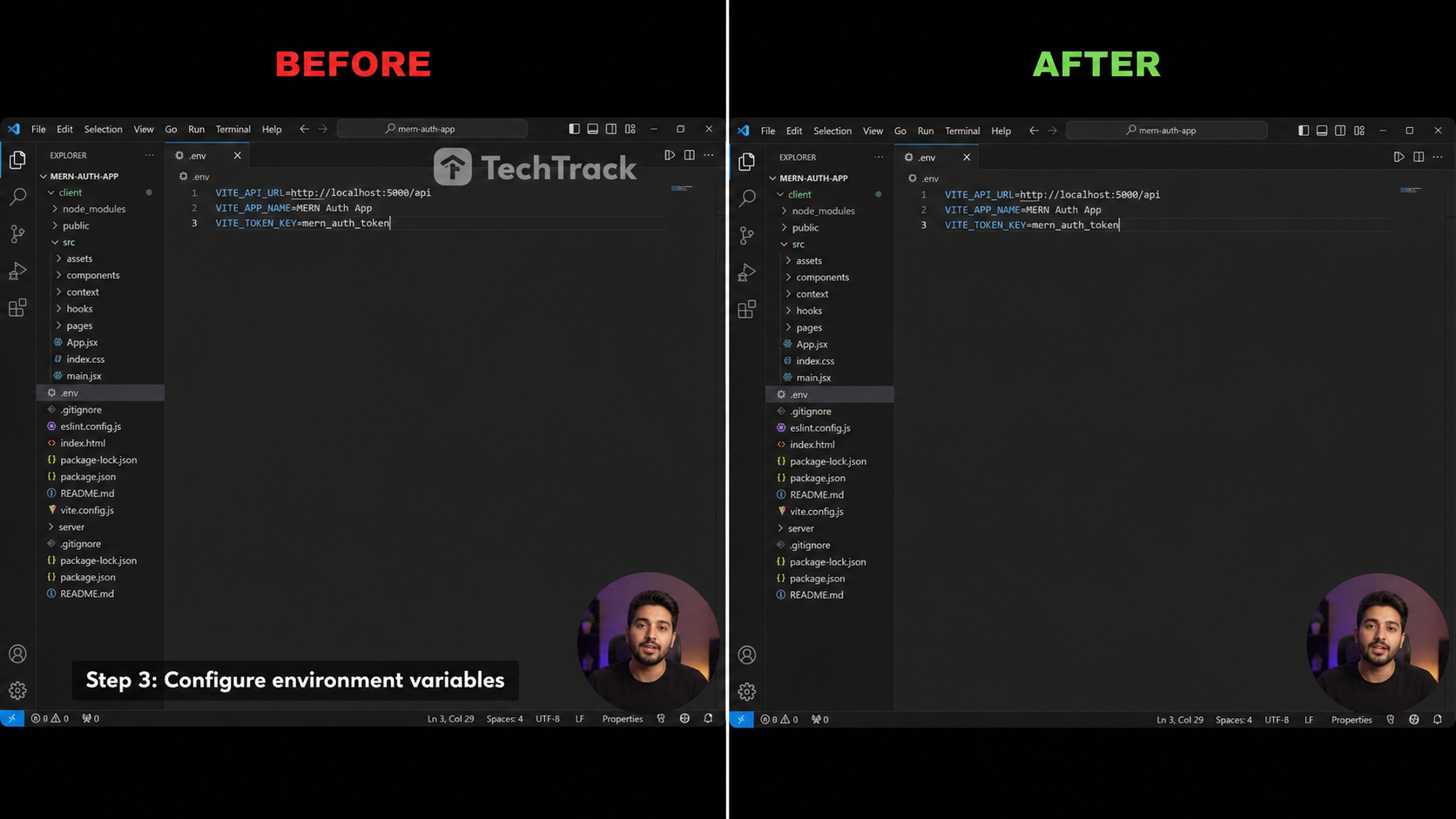
チュートリアル & 録画
画面収録の下部字幕とソフトウェアの透かしを消去します。
 処理前処理後
アニメ・ファンサブ
アニメや卡通クリップの焼き込み字幕を除去。
 処理前処理後
ウェビナー・講義
オンライン講義や録画の下部ネームテロップを消去。
クリーンな動画への3つのステップ
タイムラインもキーフレームもなし — アップロード、選択、ダウンロードだけ。

アップロードして選択
クリップをドロップし、エメラルド色の四角形を字幕または透かし領域の上にドラッグ。

AIが消去
インペイントモデルがマスクされたエリアをフレームごとに埋め、モーションとディテールを保持。

クリーンな動画をダウンロード
結果をプレビューし、ワンクリックでクリーンなHD MP4をエクスポート — ロゴも字幕もなし。
クリーンでぼやけのない出力のために構築
ブラウザ内でプロレベルのAI消去、インストール不要。
AI搭載の消去
拡散ベースのインペイントモデルが選択領域を埋め、エッジが周囲のシーンとシームレスにブレンドします。
ピクセル精度の選択
エメラルド色の四角形をドラッグして、消去したい字幕行や透かしを正確に枠で囲み — 必要以上に広げません。
ぼやけのアーティファクトなし
単純なぼかしツールと異なり、高速モーションやテクスチャ背景でもフレームはシャープで自然なまま。
透かしとロゴの除去
焼き込みキャプション、埋め込み字幕、チャンネルロゴ、静的透かしすべてに機能。
HD品質を保持
出力はオリジナルの解像度、フレームレート、ビットレートを保持 — 再エンコードの品質低下なし。
100%プライベート
動画はオンデマンドで処理され、訓練には使用されません。実行後に自動削除。
動画に焼き込まれたものを消去
選択ボックス一つで、あらゆる文字やオーバーレイをきれいに消除。
焼き込み字幕
画面に固定された字幕。
翻訳字幕
上に重ねられた第2字幕トラック。
下部字幕バー
画面下部の帯状キャプション。
チャンネルロゴ
隅の局ロゴや識別子。
透かし
静止または軽く動く透かし。
テキスト・ステッカー
画面の文字、絵文字、ステッカー。
PixMindの比較
本物のAI補正と、従来のぼかし/切り抜きの違い。
| 機能 | PixMind | 一般的なオンラインツール | 手動ぼかし/切り抜き |
|---|---|---|---|
| AI補正、ぼやけなし | |||
| 元の画質を維持 | |||
| 透かし・ロゴ除去 | |||
| ブラウザで完結、インストール不要 | |||
| 自動検出+手動選択 | |||
| プライベート、自動削除 | |||
| 毎日無料クレジット |
PixMindの機能は2026-07-18時点の製品を反映しています。競合の仕様は製品により異なり、変化するため各公式サイトでご確認ください。
クレジットの計算方法
消した分だけ課金—サブスクなし、想定外なし。
PROエンジン
Tencent Cloudの補正—複雑な背景でも最もきれい。多くの動画に推奨。
BASEエンジン
専用GPU補正—より速く安く、シンプルな素材向け。
| 選択範囲 | ティア | クレジット/30秒 |
|---|---|---|
| 小範囲(≤1920×240) | Tier 1 | 200 |
| 標準範囲(≤1920×1080) | Tier 2 | 300 |
| 大範囲(>1920×1080) | Tier 3 | 400 |
| 任意の範囲 | BASE | 100 |
- 自動検出モードは全画面で課金、手動モードは選択範囲で課金します。
- 合計 = ⌈ 長さ ÷ 30秒 ⌉ × ティア単価。実行前にライブ見積もりを表示。
- ログイン済みアカウントは毎日無料クレジット—無料で試せます。
動画字幕除去ツールの利用者
クリーンなソースクリップを必要とするクリエイターのために構築。
コンテンツクリエイター
別のプラットフォームの焼き込みキャプションなしで、TikTok、Reels、Shortsにわたりクリップを再投稿。
翻訳者
独自のローカライズされたキャプションやSRTトラックをオーバーレイする前に、焼き込み字幕を除去。
マーケター
ライセンスされたストック映像から競合の透かしや製品ロゴを除去。
アーキビスト
再公開前にチャンネルバグや焼き込みブランディングをクリーンアップして、レガシークリップを復元。
字幕と透かしの除去への回答
消去する前に知りたいかもしれないすべて。