How to Turn One Product Photo Into a Full Ad Campaign
The safest way to turn one product photo into several AI ad assets is to build a controlled workflow: keep the approved photo and product facts as the source of truth, create separate accuracy and creative branches, review each result, and only then move a selected frame into video. In PixMind Canvas, those references, prompts, branches, and selections remain connected in one visual project instead of becoming a folder of unrelated exports.
This tutorial is a reusable production template based on the PixMind Canvas available on September 3, 2026. It uses PixMind-owned example media to explain the process; it is not a controlled model test or a claim that the examples improved ad performance. Models, controls, credit estimates, and provider routes can change. For a specific generation, the options shown in the live interface are authoritative.
Key takeaways
- Protect product truth before exploring style: silhouette, color, label placement, material, scale, and approved claims.
- Create one accuracy branch and a small number of intentionally different creative branches.
- Use the source photo as a visual reference, not as proof that generated packaging text is correct.
- Review at the final crop and delivery size before sending a still into video.
- Use Canvas for connected campaign work, the Product Image app for a guided single-purpose flow, a direct generator for one asset, and the API for repeatable production systems.
Reviewed by the PixMind Product Editorial team. Product behavior and public pages were checked on September 3, 2026.
In this guide
- What you will build
- Prepare the source photo and product facts
- Map the workflow before generating
- Build the campaign step by step
- Reusable prompt templates
- Choose models and controls
- Review every deliverable
- Choose the right PixMind workflow
- Costs, rights, and privacy
- Sources and verification
- Frequently asked questions
What will this AI product ad workflow produce?
Start with a small campaign set rather than asking one prompt to make “everything.” Each deliverable has a different job, crop, and review standard.
| Deliverable | Typical ratio | Primary job | What must remain stable |
|---|---|---|---|
| Listing or catalog hero | 1:1 | Show the product clearly | Shape, color, packaging, clean edges |
| Lifestyle social creative | 4:5 | Place the product in a relevant scene | Product identity plus crop-safe composition |
| Story or Reel opening frame | 9:16 | Establish a vertical motion direction | Recognizable product and space for movement |
| Optional banner | 16:9 | Support a landing page or campaign header | Product scale, readable hierarchy, copy-safe area |
The ratios above are useful planning targets, not a promise that every currently available model exposes every ratio. Check the live route before generation.
The valuable output is not the largest pile of images. It is a traceable set in which every branch answers a specific channel need and every selected asset can be traced back to the same approved product facts. That makes review faster and corrections more precise.
Prepare the source photo and product facts
An AI workflow cannot reliably recover details that are missing or ambiguous in the reference. Before opening Canvas, gather two inputs: the best available product image and a short approved fact sheet.
Source-photo checklist
Use a photo with:
- Sharp product edges and enough resolution for the intended crop
- Neutral or understandable perspective
- Accurate color and material appearance
- Minimal obstruction across the logo, closure, controls, or other defining parts
- No confidential, unlicensed, or third-party material you are not permitted to upload
If the only available photo is already styled, identify which details belong to the product and which belong to the scene. A product surrounded by flowers, props, or reflections can still guide a creative direction, but it is less suitable as the only geometry reference.
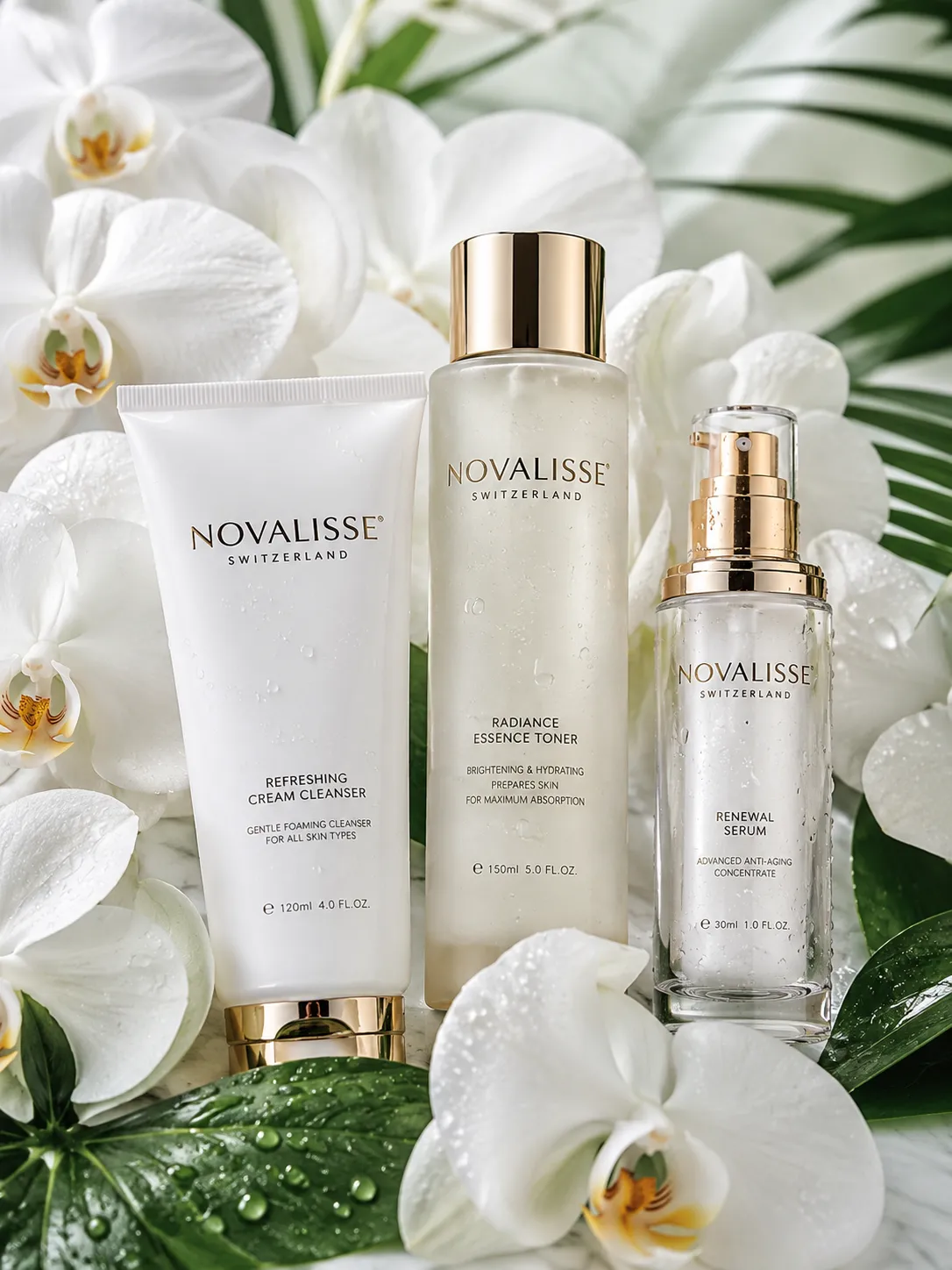
Product-fact checklist
Create a compact approved record containing:
- Exact product and variant name
- Required logo and label placement
- Package color, finish, and material
- Approximate proportions and size relationships
- Features that may not be added, removed, or redesigned
- Approved claims and mandatory disclaimers
- Forbidden words, props, settings, or competitor references
Keep final legal copy outside the generative prompt when exact wording is essential. AI-generated lettering can be malformed or invented. For critical packaging text, prices, ingredients, certifications, and regulated claims, use an approved source file or typeset the final copy after image generation.
Map the Canvas workflow before generating
Open PixMind Canvas, create a project, and build the smallest graph that can represent the campaign:
Task: delivery checklist
  ├─ Text: protected product facts
  ├─ Image: approved product reference
  │    ├─ Image branch A: accurate listing direction
  │    ├─ Image branch B: lifestyle/social direction
  │    └─ Image branch C: vertical opening-frame direction
  └─ Selected image
       └─ Video: restrained product motion
The current Canvas supports text, image, panorama, video, audio, config, and task nodes. Text nodes can hold static instructions or generate text with an available language model. Image and video nodes expose controls according to the selected live route. A saved visual graph keeps the reasoning around the assets visible, which is useful when another reviewer needs to understand why a result exists.
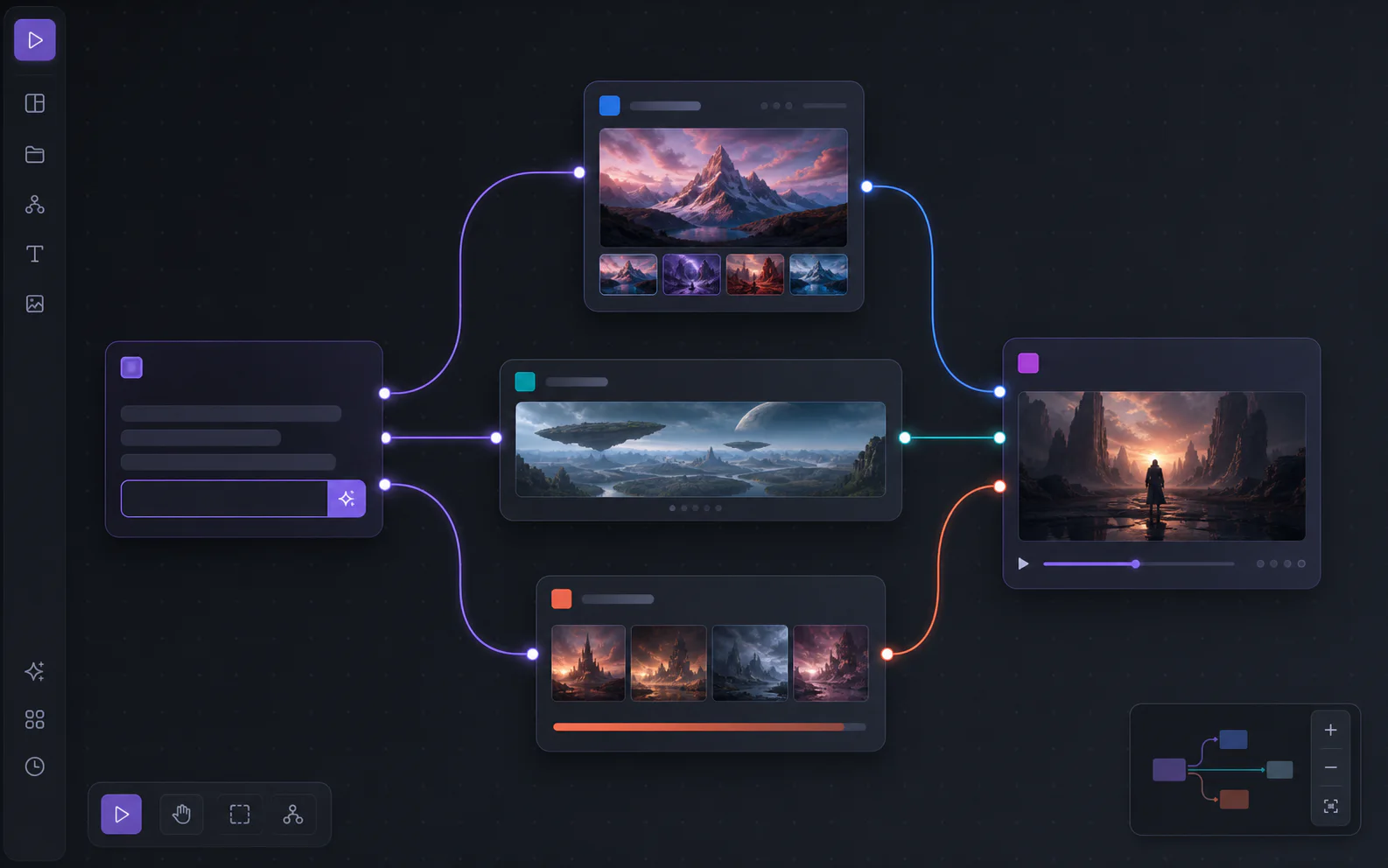
Use the Task node as an acceptance checklist, not as a giant prompt. Put shared identity constraints in one Text node. Put crop, environment, and motion instructions in their own downstream nodes so that changing the video motion does not accidentally change the listing-image brief.
Build the campaign step by step
1. Define channels before styles
Write the required deliverables and their roles first. “4:5 paid-social concept with space above the product for approved copy” is actionable. “Make a beautiful campaign” is not.
Also decide what does not belong in the AI output. Exact price cards, legal disclaimers, logos that must be vector-perfect, and long headlines are usually safer as a later design layer.
2. Add the approved product reference
Place the product image in an Image node. If multiple angles are available and the selected route supports references, use views that clarify shape rather than introducing conflicting styling. Do not assume that supplying a reference guarantees exact reconstruction; it gives the model useful context, while human review remains necessary.
3. Write one protected-facts block
Add a static Text node and connect it to the image branches. Phrase constraints as observable requirements:
Preserve the rectangular amber-glass bottle, black cylindrical cap, front-facing proportions, label position, glass transparency, and warm amber liquid. Do not add text, logos, accessories, hands, duplicate products, or packaging redesigns.
Avoid mixing product facts with vague praise such as “best,” “clinically proven,” or “luxury-grade” unless those words are approved claims. The prompt is not a substitute for substantiation.
4. Create the accuracy branch first
Make the first branch visually conservative. Ask for a clean background, centered composition, grounded shadow, and sufficient separation between the product edge and background. This branch reveals identity problems before decorative scenes make them harder to notice.
Review the result against the source at high zoom. If the cap shape, color, logo area, proportions, or material is already drifting, revise the prompt, reference, or model choice before building more branches.
5. Create two distinct creative branches
Branch from the same protected facts and product reference. Change one creative system at a time.
- Lifestyle branch: specify the environment, surface, lighting direction, palette, and negative space.
- Vertical motion branch: specify a simple set, a stable opening composition, depth layers, and room for restrained camera or environmental movement.
Two purposeful directions teach you more than ten variations that differ only in random decoration. If both branches fail in the same way, the shared source or constraint block is probably the cause. If only one fails, inspect that branch’s instructions and settings.
6. Select by product truth, then by style
Reject any concept that changes the actual product even if the scene looks attractive. Compare the survivors on hierarchy, channel fit, copy space, crop resilience, and whether the lighting is physically coherent with the product material.
A useful selection order is:
- Product identity and claims are acceptable
- Composition works at the final ratio
- Background supports rather than competes
- The concept is distinct from other selected variants
- The file is suitable for finishing and export
7. Hand one approved frame into video
Connect the selected vertical frame to a Video node when the live route supports the relevant reference workflow. Keep the motion brief restrained: one camera move, one product action, and one environmental behavior. Complex choreography creates more places for the package, logo area, or geometry to deform.
For example:
Five-second premium product reveal. Slow push-in toward the centered bottle. Soft window-light movement across the background only. Preserve bottle geometry, cap, label area, liquid color, and product scale. No morphing, rotation, extra objects, hands, or new text.
Available duration, resolution, audio, watermark, first/last-frame, and reference controls depend on the selected video route. Use only controls visible in the live node.
8. Export, finish, and document the decision
Export only approved candidates. Add exact copy, logos, prices, and disclaimers in a deterministic design tool when accuracy matters. Record the selected asset, final crop, intended channel, and any manual corrections in the project task or campaign handoff.
Do not treat generation as the final approval step. The final file should pass brand, product, legal, and platform review at the size customers will actually see.
Reusable prompt templates
Replace bracketed fields with approved information. Keep product constraints consistent across branches.
Clean listing direction
Create a clean ecommerce hero image of the supplied [product]. Preserve [shape], [color], [material], [closure or controls], and [label position]. Centered three-quarter view on a [background color] seamless background, soft grounded shadow, even studio lighting, crisp product edges, no props, no extra text, no duplicate product, no redesign. Compose for [ratio].
Lifestyle social direction
Place the supplied [product] in a [specific environment] for a [audience or occasion] campaign. Preserve [protected product facts]. Use [lighting direction], [palette], and [surface]. Leave clean negative space in the [location] for separately typeset copy. No hands, no new logo, no invented label text, no competing products. Compose for 4:5.
Vertical opening frame
Create a 9:16 opening frame for a short product video. The supplied [product] remains centered in the lower-middle safe area with [foreground], [midground], and [background] depth. Preserve [protected product facts]. Design the lighting and scene for a slow [push-in / lateral move]. No text, no morphing cues, no duplicate product.
Video motion direction
Animate the approved reference frame for [duration available in the live route]. Camera: [one simple movement]. Product: remains stationary and geometrically stable. Environment: [one subtle behavior]. Preserve [shape, closure, label area, color, scale]. No morphing, rotation, new objects, hands, or text.
Prompts are production instructions, not magic formulas. A better reference, clearer constraint, or more suitable model route may matter more than adding adjectives.
How should you choose models and controls?
Choose from the models and settings shown in the live PixMind node. For product work, prioritize capabilities in this order:
- Support for the reference type you need
- Product and composition consistency
- Suitable aspect ratio and resolution
- Editing or variation controls for correction
- Speed and credit cost
Do not choose a route only because it is newest or produces dramatic samples. A visually bold model may be useful for concept exploration, while a more controllable route may be better for the accuracy branch. The available model name is part of the project record, but it should not become the only explanation for a good or bad result.
If a required option is absent, do not imply that the platform or model supports it. Change the route, adjust the workflow, or finish that requirement in another tool.
Review every deliverable before use
Review the generated file beside the approved source—not from memory.
Product and brand QA
- Silhouette, proportions, closure, buttons, seams, and materials match
- Product color remains within an acceptable range
- Logo and label areas are not invented, mirrored, or malformed
- Product scale is believable relative to hands, props, furniture, or scenery
- No unauthorized claims, certifications, ingredients, prices, or packaging copy appear
- Reflections, transparency, shadows, and contact points are physically plausible
Channel and composition QA
- The subject remains intact in the final crop
- Copy-safe space is genuinely usable
- Important content avoids common interface overlays on vertical placements
- The listing version is clear at thumbnail size
- The selected variants are meaningfully different rather than near-duplicates
Video QA
- Product geometry is stable from first frame to last
- Labels and closures do not crawl, melt, or switch position
- Motion has a clear beginning and end
- The camera move does not reveal unsupported product sides
- Audio, music, voices, fonts, and likenesses have the required permissions
For regulated categories such as cosmetics, supplements, health products, finance, or alcohol, route the final creative through the organization’s normal compliance process. AI generation does not validate a claim.
Canvas, Product Image app, direct generator, or API?
| Starting point | Best for | Choose it when |
|---|---|---|
| PixMind Canvas | Connected multi-asset campaigns | You need visible branches, shared references, review context, and image-to-video handoff |
| Product Image app | Guided product-image tasks | You want a focused flow for backgrounds, scenes, formats, or variants without building a graph |
| AI Image Generator | One still image | The brief, route, and output settings are already known |
| AI Video Generator | One isolated clip | You already have the prompt or reference and do not need campaign branching |
| PixMind API | Repeatable production systems | Your team needs programmatic requests, asynchronous task-status handling, or product integration |
Canvas is the strongest starting point for this tutorial because the relationships between the source, protected facts, creative directions, selection, and video step are part of the deliverable. If you only need one white-background image, the guided Product Image flow may be faster.
For an API production pipeline, implement and document your own retry policy, request logging, and failure handling unless the current API documentation explicitly provides the behavior you need.
Costs, commercial rights, and privacy
Before generation, review the credit estimate and plan information shown in the live interface and on the pricing page. Costs can differ by model, resolution, duration, output count, and provider route. Generate a small accuracy check before committing credits to many branches or longer video outputs.
Eligible outputs created while a paid PixMind membership is active may be used commercially, subject to the PixMind Terms, applicable model or provider terms, your rights in the inputs, third-party rights, and applicable law. A paid subscription is not automatic clearance for trademarks, trade dress, people’s likenesses, music, fonts, packaging claims, or other protected material.
Upload only material you are authorized to process. Avoid confidential prototypes, unreleased packaging, personal data, or licensed assets when your organization has not approved the processing route. Keep source permissions and final approvals with the campaign record.
Sources and verification
This workflow was checked against PixMind’s public product surfaces on September 3, 2026:
- PixMind AI Infinite Canvas for the visual workspace, node types, connected campaign example, Agent context, and project workflow
- PixMind Product Image for the guided product-photo workflow and current product-image use cases
- PixMind pricing for plan and credit context
- PixMind Terms for the governing commercial-use conditions
- PixMind AI Infinite Canvas guide for a broader explanation of nodes, connections, saving, and route-dependent controls
Because PixMind can update model routes and controls, confirm availability and cost in the live workspace before starting a production batch.
Frequently asked questions
Can one product photo really produce a complete campaign?
One strong reference can support initial listing, lifestyle, vertical-frame, and video concepts, but it may not show every product side or detail required for accurate reconstruction. Use additional approved angles when available and when the chosen route supports them. Final assets still require human review and often deterministic typesetting.
How do I keep the product consistent across images?
Reuse the same approved reference and protected-facts block, create an accuracy branch first, limit the number of variables changed per branch, and compare every result directly with the source. Reference input improves context but does not guarantee exact identity.
Should I ask the image model to render the final headline and price?
Not when exact wording matters. Reserve negative space during generation, then add approved headlines, prices, legal text, and logos in a design tool. This reduces the risk of malformed or invented copy.
When should I turn the selected image into video?
Only after the still frame passes product, brand, crop, and compliance review. Starting video from a flawed image can compound the error across many frames.
Does every PixMind video model support the same reference and motion controls?
No. Reference modes, duration, resolution, audio, watermark, first/last-frame, and other controls depend on the current route. Use the settings visible in the live Video node or generator.
Can I use the generated ads commercially?
Eligible outputs created during an active paid membership may be used commercially under PixMind’s terms, but you remain responsible for input rights, model or provider conditions, third-party intellectual property, likenesses, music, claims, and applicable law. Paid access is not blanket legal clearance.
Is Canvas better than the Product Image app?
They serve different scopes. Canvas is better when several assets share one source and must stay connected through selection and video. The Product Image app is simpler for a focused product-image task such as changing a background or generating a small set of variants.
The campaign does not end when the model returns a file. It ends when each asset is accurate, channel-ready, approved, and traceable to the source and decisions that produced it.